
See the whole floor without rewriting the whiteboard
Every repair order lives on one board — Estimates, In Progress, Ready for Pickup — so the counter, the bay, and the owner look at the same work, not a dry-erase guess.
On Pro. The job board is part of founding Pro. No Elite unlock required to drag an RO across the floor.
RO #1047 · 2018 Honda CR-V · Brake pads R&R · A. Rivera
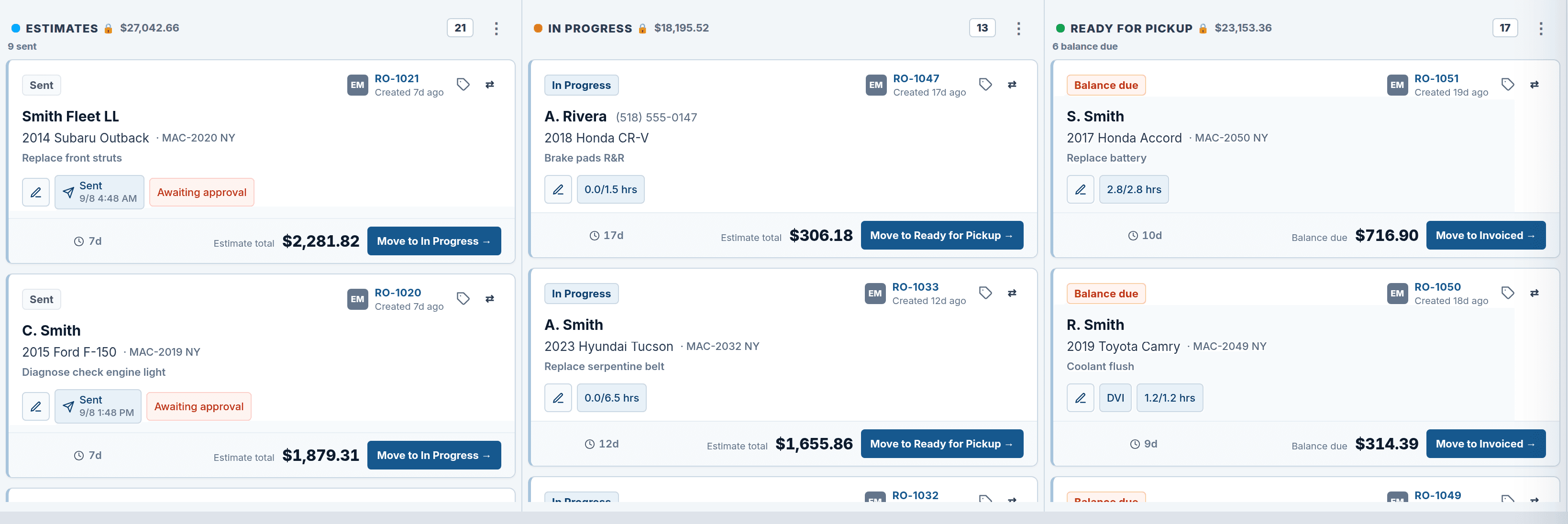
Live SMS Work Board (scrubbed). Third column is Ready for Pickup — not Completed. Continuity: RO #1047 · A. Rivera · 2018 Honda CR-V · Brake pads R&R in In Progress. Other tickets are labeled story chrome.
Operate
One board. One repair order. No second system.
Most shops still run status on a whiteboard. Morning starts with names and RO numbers in marker. By lunch the board lies a little. By close someone photographs it “for the record,” because the record was never in the shop software — it was on the wall.
ShopRally’s job board is the record. Three columns match the stages the floor already speaks: Estimates, In Progress, and Ready for Pickup. You are not learning a new vocabulary. You are putting the stages you already shout across the shop onto the same repair orders the counter builds and the bay finishes.
When an advisor writes an estimate, that RO sits in Estimates. When the customer approves — on Pro, that is text or email to approve with e-sign, not a two-way SMS inbox — the card can move to In Progress. When the bay is done and the ticket is ready for pickup or close-out, it lands in Ready for Pickup. Dragging (or moving) is the visible action. The invisible win is quieter and more important: estimate lines, inspection findings, and payment status stay attached to the same RO the card represents.
This is not a status toy bolted onto a separate DMS. The board is the floor view of the RO workspace. Open a card and you are in the job — not in a parallel sticky that someone has to keep honest by hand.
- Column headers
- Estimates, In Progress, Ready for Pickup — live SMS labels.
- Card face
- Card = repair order. RO-1047 is the same CR-V ticket.
- In Progress
- Approve can move the work — no rewrite.
Estimates → In Progress → Ready for Pickup — quote, approved work, cars waiting at the curb.
A morning-to-close path
A day on the board
Not three generic verbs. A concrete morning-to-close path so owners see when the board earns its keep.
7:45
Open the floor
Yesterday’s estimates still sit. Overnight approvals already in WIP.
9:10
Estimate becomes work
CR-V #1047 — send Pro approve, then the card can move.
2:05
Bay finishes
Silverado #1046 lands in Ready for Pickup when the ticket is ready.
7:45 — Open the floor. Owner or service writer lands on the job board before the first drop-off. Open estimates from yesterday still sit in Estimates. Overnight approvals, if any, already show in In Progress. Nobody asks who erased the Camry. The board did not get wiped at 6 p.m.
9:10 — Estimate becomes real work. CR-V #1047 gets a brake job estimate. The card appears in Estimates with the vehicle and RO number. The advisor sends the Pro approve link from that same RO — text or email to review and e-sign, not a chat product. When the customer signs, the card can move to In Progress. The bay sees the same repair order the counter just closed verbally.
11:40 — Midday load check. Three cars in WIP, two still estimating. The owner reads column counts instead of walking the stalls with a clipboard. If a job is waiting on parts, that truth still lives on the RO. The board shows where work sits; it does not invent a second parts tracker for the landing page.
2:05 — Bay finishes, board tells the truth. Silverado #1046 moves to Ready for Pickup when the RO is ready for the customer or close-out. The counter does not rewrite DONE in green marker that smears by Thursday. Ready for Pickup means the ticket advanced — not that someone remembered to update the wall.
4:30 — Close without a photo of the whiteboard. The Ready for Pickup column is the day’s finished story. Live Operations Daily Snapshot can summarize open ROs, WIP today, and collected totals for the morning money picture. The job board remains the live floor map. Snapshot points into the same system; it is not a spreadsheet export you reconcile after dark.
Contrast
Whiteboard mornings vs. a board that stays true
Before
Dry-erase columns lag the real RO state by lunch. The “backup” is a phone photo of the wall. “Who’s on that F-150?” gets answered by shouting across the shop. Estimates live in one place; status lives in another. Closing the day means scrubbing markers and guessing tomorrow’s board before anyone has clocked out.
After
Estimates, In Progress, and Ready for Pickup always map to live repair orders. You move a card when approve happens or the bay finishes — status and record stay one. Open the card and you get the same estimate, inspection, and payments the counter already used. An owner load check takes seconds from column density, not a walkabout. Founding Pro includes the board. You do not buy a separate “workflow SKU” to stop rewriting markers.
Before
EST — Camry ?? / CR-V ???
WIP — F-150 (who’s on it?)
DONE — erased 6pm
Muted whiteboard — messy marks, phone-photo backup.
After
Estimates · In Progress · Ready for Pickup
Live SMS Work Board. RO-1047 · A. Rivera · 2018 Honda CR-V · Brake pads R&R sits in In Progress. The third column is Ready for Pickup — not a dry-erase “DONE.”
Illustrative contrast — not a competitor teardown.
Honest packaging
What’s on Pro (and what this page will not invent)
Job board is on Pro. Founding shops get Estimates → In Progress → Ready for Pickup as part of the core Operate surface — not an Elite upgrade and not an Ultra AI layer.
What we claim here. One board for floor status. Cards that open the same repair order. Drag or move when work advances. Pairing with Estimates & RO workspace and Live Operations Daily Snapshot.
What we will not claim here. Elite-only board views. Automated bay balancing as a sold Ultra feature. Two-way SMS from the board (two-way SMS is Elite on its own page; Pro approvals stay text/email + e-sign). Third-party history or labor chrome. “AI prioritizes your WIP” chips. Fake time-saved or ARO percentages.
If Elite appears on this page at all, it is only as a soft pair note — for example, appointment reminders and online booking live on Elite — never as “Elite unlocks a better job board.”
| Capability | Pro | Elite | Ultra |
|---|---|---|---|
| Job board (Estimates / In Progress / Ready for Pickup) | Yes | Same board | Same board |
| Card opens full RO | Yes | Yes | Yes |
| Elite-only board features | — | None claimed | None claimed |
Works next to
Pairs with
- On ProEstimates & RO workspaceBuild jobs, labor, and parts on the same RO the board card opens. The board shows where work sits. The workspace is where work is written.Open
- On ProLive Operations Daily SnapshotMonday numbers — open ROs, WIP today, collected — without exporting a spreadsheet. Snapshot points at the same repair orders the board already displays.Open
Also: Appointments schedule when a vehicle is expected — Elite adds reminders and online booking.
Packaging
Questions about this feature
Is the job board only on Elite?
If I move a card, am I editing a sticky note or the real RO?
How is this different from the appointments calendar?
Do I still need a whiteboard for the techs?
Does moving to WIP mean the customer already approved?
Will Ultra add AI that runs my board for me?
Reserve a founding seat
Founding shops get Pro, Elite, or Ultra at launch. The job board is already on Pro — see plans if you want the full packaging map in one place.
Launching Q4 2026 · no card · we'll invite you at launch
Built by a shop owner · Launching Q4 2026