
Show them the wear — then approve the estimate
Multi-point inspections with red/yellow/green ratings and photo markup, shared as a link the customer opens before they approve the estimate on the same repair order.
On Pro. Share findings and collect estimate approval without Elite two-way SMS.
Bay tablet · inspection on the RO
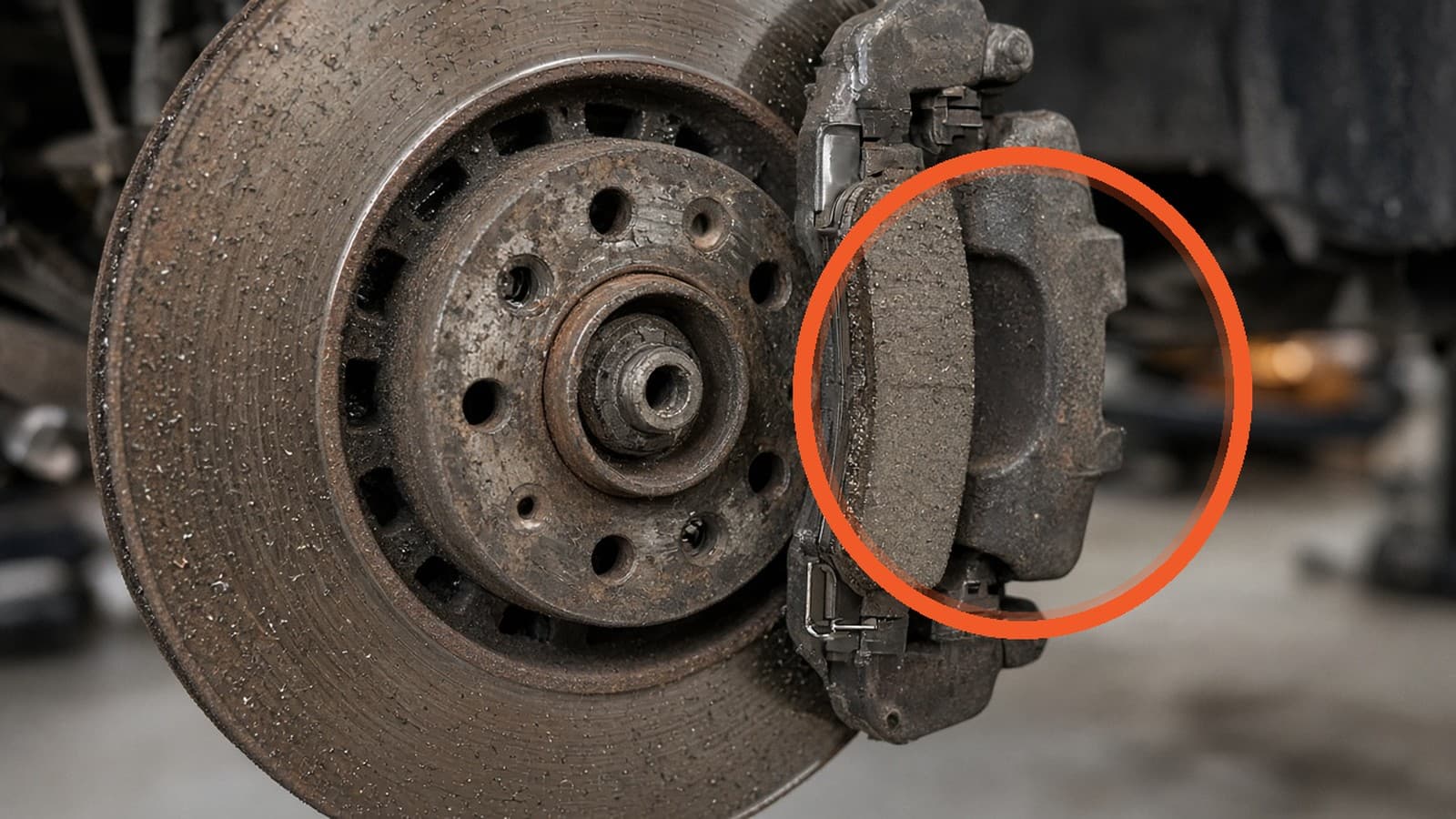
Front brake pads
Needs attentionCustomer phone · findings share
Front pads at 2 mm. Replace soon — see the wear on the photo.
Review estimateBrake pads R&R · On estimate
On estimateIllustrative labor and part totals — story chrome, not a live ticket.
The evidence problem
The phone call that loses the sale
The advisor says the pads are at two millimeters. On the other end of the line, the customer hears a sales pitch. There is no photo in their hand — only a voice and a number. The paper clipboard stayed in the bay. By the time someone promises to “text a picture,” the moment has cooled, callbacks stack up, and work the customer might have approved never gets a clear yes or no.
That is not a marketing problem. It is an evidence problem. If the bay and the phone do not tell the same story, every recommendation feels like a ask. ShopRally’s digital vehicle inspection is built so the finding, the photo, and the estimate live on one repair order — and the customer can see the wear before they decide on the estimate.
When findings stay on paper, declined or deferred work often dies undocumented. This page does not claim a declined-work recovery campaign or deferred-service CRM. It claims clearer evidence at the moment of the estimate.
On the RO
Evidence the customer can see: markup + red / yellow / green
A multi-point inspection on ShopRally is a shop template on the repair order — not a clipboard you retype later. Techs walk the vehicle, mark each item, and attach what the advisor will actually talk through.
Red / yellow / green makes urgency readable at a glance: red for needs attention now, yellow for watch soon, green for okay. Photo markup — a circle, an arrow, a short note — puts the wear in the frame so the customer is not guessing which pad, which hose, which corner of the tire.
The finding sits next to the estimate line it supports. When the advisor adds brake pads R&R, the marked photo is already on that same RO. The counter is not hunting a text thread for “the picture from this morning.” The bay and the estimate share one record.
What this page claims: shop templates on the RO, RYG ratings, photos with markup, findings tied to estimate lines. What this page does not claim: video or voice notes, certified coach checklists, auto-generated tech notes, or mapping canned jobs to findings automatically.
1
Template on the RO
Shop multi-point — not a clipboard you retype later.
2
RYG on a finding
Red needs attention now. Yellow watch. Green okay.
3
Markup on the photo
Circle, arrow, short note — which pad, which corner.
4
Finding beside the line
Brake pads R&R sits next to the marked photo on the same RO.
Red urgent · Yellow watch · Green OK
Share is not a separate product
Share findings → approve the estimate
Inspection share is not a separate product story. It is how the evidence leaves the bay and lands on the customer’s phone — on Pro.
- Finish the inspection on the RO. Ratings and photos live with the estimate that will use them.
- Share the findings link by text or email. No customer app install.
- They open the link and see the same markup the tech captured.
- They approve the estimate on that same repair order — Pro text or email to approve with e-sign. They are not “approving the inspection.” They are approving the work, with the evidence in view.
Honest channel callout
Pro
Inspection share link + text/email estimate approve + e-sign
Elite
Same evidence chain, plus a two-way SMS inbox and templates if the shop wants a conversation thread about the findings
Ultra
Not required for DVI. Do not invent AI inspection notes on this page.
Elite conversation is an upgrade for shops that want a thread. It is not a gate to show photos or collect a yes. Approvals stay owned by the Pro approve path; two-way SMS is owned on Two-way SMS.
1
Open link
2
Marked photo
3
Review estimate
4
Approve / Sign & approve
Pro: share + estimate approve. Elite: optional thread.
Revenue chain
Evidence → estimate → money
Digital inspection is the front half of Pro revenue — not a standalone checklist toy.
- 1Inspect
- 2Mark up
- 3Share findings
- 4Estimate lines
- 5Customer approves
Each step stays on one RO. The inspection does not live in a side app the counter has to re-key. When the customer says yes, the bay already has the same ticket. Parts ordering (including PartsTech punchout on Pro) comes after the approve moment — it is not a DVI claim on this page; it is the next honest link in the shop’s money path.
Deep links for the chain: Estimates & RO workspace, Approvals, Digital estimates.
Honest packaging
What’s on Pro (this feature only)
| Capability | Pro | Elite | Ultra |
|---|---|---|---|
| Multi-point + RYG + photo markup | Yes | Yes | Yes |
| Inspection share link | Yes | Yes | Yes |
| Text/email estimate approve + e-sign | Yes | Yes | Yes |
| Two-way SMS thread about findings | — | Yes | Yes |
Packaging
Questions about this feature
Is inspection share included on Pro?
Do customers need an app?
Does ShopRally include third-party vehicle history reports?
How does this turn into approved work?
Is two-way texting required for digital inspections?
What about /features/inspection-share?
Reserve a founding seat
Put the wear on their phone — then get the estimate signed.
Founding Pro includes digital inspections, share links, and text/email estimate approve with e-sign. Elite two-way SMS is optional when you want a thread — not a requirement to show evidence.
Launching Q4 2026 · no card · we'll invite you at launch
Built by a shop owner · Launching Q4 2026